Conflict warnings before you publish
Double-booked, on approved time off, or outside someone’s availability? The shift turns red right on the board.
Scheduling for restaurants, cafés & shops
Drag shifts onto your team. Hit publish. Everyone sees their hours on their phone, and you stop texting screenshots of a spreadsheet.
| Thu | Fri | Sat | |
|---|---|---|---|
| Priya | 7a–3pOpening | Time off | |
| Luis | 11a–7pMid | ||
| Sam |
The schedule board
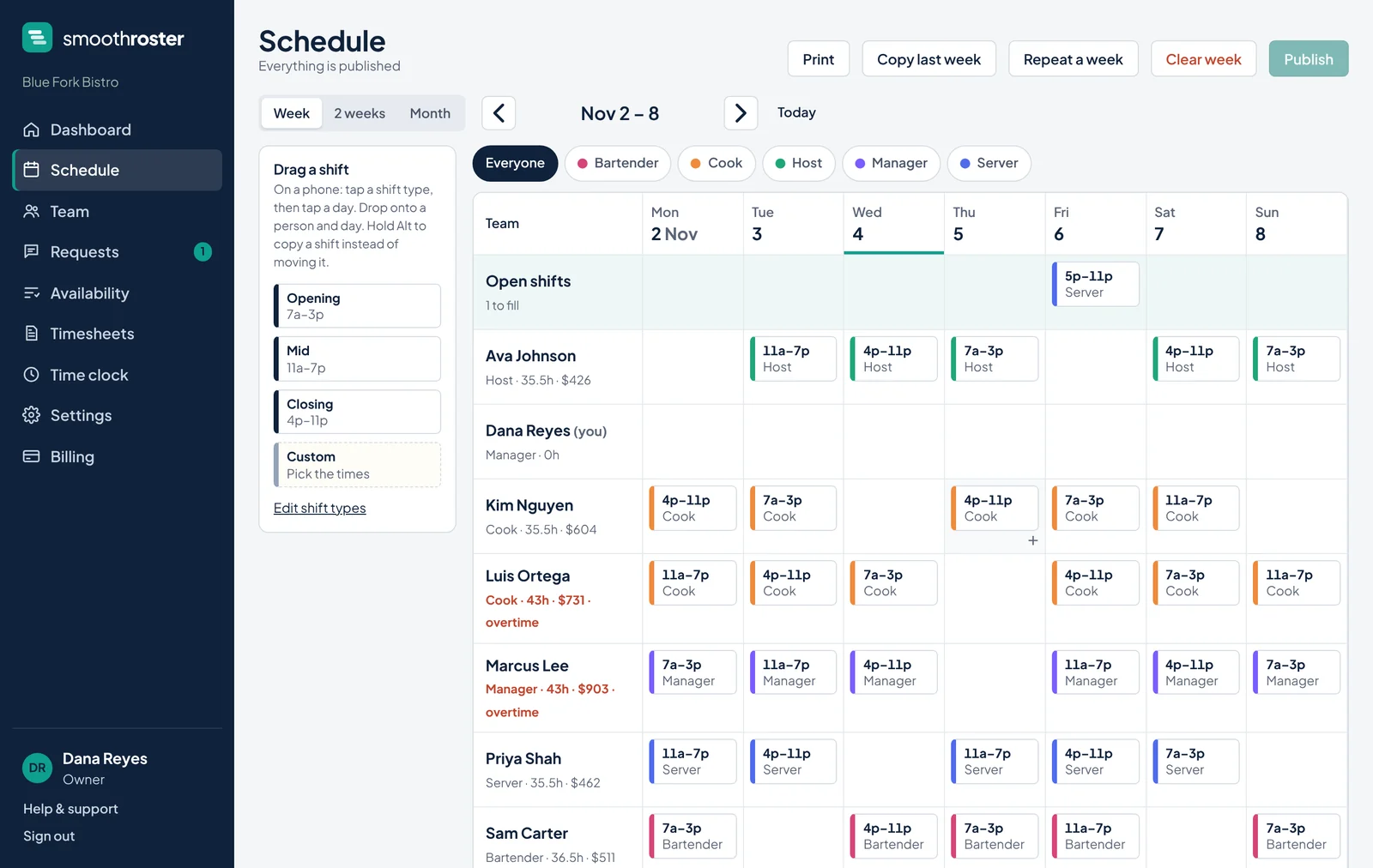
Every person, every shift, every hour and what it costs, on one screen. Drag to build it, drag to change it.
Built for the floor
And nothing they have to learn.
Double-booked, on approved time off, or outside someone’s availability? The shift turns red right on the board.
Hours and wages add up per person and per day while you drag, at the right pay rate for each position. Overtime gets flagged past 40 hours.
Staff offer a shift they can’t make, a coworker takes it, and nothing changes hands until you approve.
Open a shift and see who’s free, available and under 40 hours, ranked for you.
Staff ask from their phone. You approve in one tap and it shows up on the board.
Clock in from any phone, or switch it off if your POS already does it. Timesheets export to CSV.
Same team, same rhythm? Copy last week, or repeat one across the whole month, in one click.
A clean, one-page printout of the week for anyone who still likes paper by the time clock.
Tap Cooks, build their week, publish. Then Bartenders, then Servers. Each tab shows what still needs publishing, and only that team is notified.
A cook who also bartends shows up on both teams, with a different pay rate for each. Their phone shows which job each shift is.
For your team
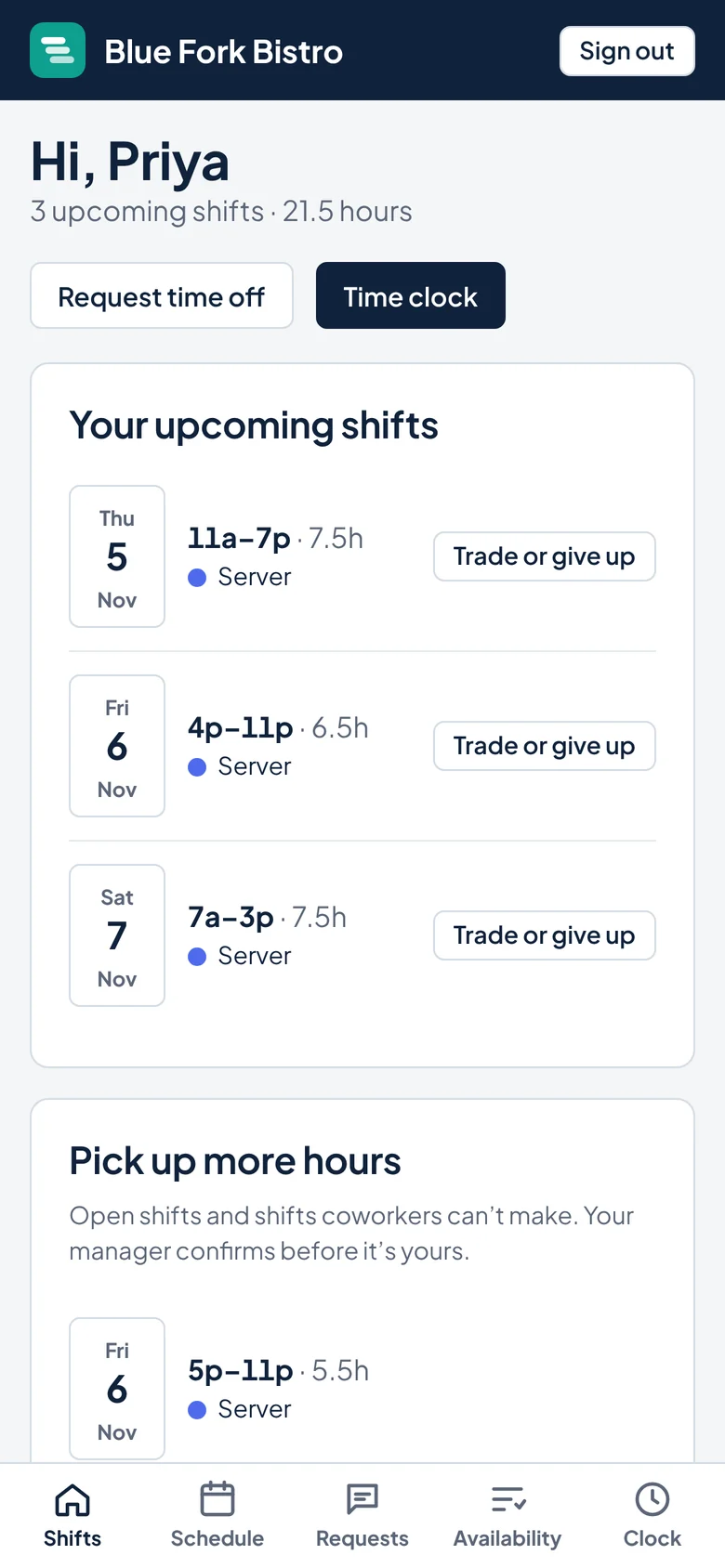
No logins to forget and no app store. Your team opens a link, adds it to their home screen, and it works like an app.
Getting started
Type a name and email. They get a link to set a password, and that’s their whole onboarding.
Pick Opening, Mid or Close from the side and drop it on a person, one position at a time if you like. Copy last week, or repeat it across the month, in one click.
Your team gets notified and sees the schedule on their phone. Changes stay as drafts until you publish again.
Pricing
Your whole team is one price, and it doesn’t go up when you hire.
For a single location getting off spreadsheets.
Everything, for teams of any size.
Up to $2,652 a year back in your pocket.
Every plan starts with a 14-day free trial with every Pro feature, for up to 40 people. No card needed. Cancel anytime.
Questions
Something else? Sign in and use Help & support, and a real person answers.
No. It works in any phone browser. They can add it to their home screen like an app and get notifications there.
Yes. Give someone the Manager role and they can build and publish schedules. Employees only see the published schedule and their own requests.
Your schedules stay put and remain viewable. Pick a plan to keep editing. Nothing is deleted.
Yes. Give them a main position and tick the others they can work, each with its own hourly wage if the pay is different. They show up on each position’s tab, labor cost uses the right rate for every shift, and their phone shows which job each shift is.
Yes. Pick a position tab, like Cooks, and build their week. Publish just that group, then move on to Bartenders. Only the people whose shifts changed are notified. Or build everyone and publish it all at once from the Everyone tab.
Yes. Switch between a week, two weeks or a whole month, repeat a week across the next month in one click, and publish up to a month at a time.
No. The owner can switch the time clock off in Settings and it disappears for everyone.
Anytime. Owners can download all of their business’s data from Settings, and timesheets export to CSV.
Free for 14 days. No card, no setup call, no contract.
Start free trial